WE HAVE BEEN trialling the various beta programmes from the main online mail-behemoths since their respective inceptions. In fact, we have been unfortunate enough to have to use each one daily and today we’re going to take a quick look at each service, comparing and contrasting each product’s offerings.
Yahoo! Mail beta :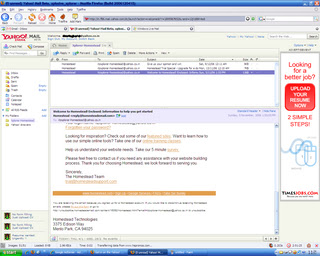
The original Yahoo Mail web-based client is now looking somewhat dated compared to offer newer offerings. Enter the new beta service from Yahoo, which is a giant step-up from the previous old, clunky interface. The new beta is fully Ajax‘d up and is easily the most immediately impressive out of the three products being examined here. The interface is very clear, easy to use, very quick to respond and is more reminiscent of a fully fledged desktop client than a browser-based utility. Its definitely a contender for an idealistic 'Web 2.0' product.
A clearly defined left-hand-side navigation pane, and a multi-tab viewing window that allows, for example, your inbox coupled with a preview pane or a newly invoked tab displaying an individual email, is easily one of the best interfaces for web-mail I’ve used to date. These sort of advanced Ajax features could be slow and unresponsive in a poorly implemented design – but Yahoo has ensured they’re almost as quick as a standard desktop application, with the added portability of a web-based client. It works perfectly with Firefox and now wth Opera too. All of these positive attributes add-up to ensure Yahoo is on to a winner with their updated mail service.
INQ RATING :9/10Excellent 'Web 2.0' functionality, competently able to replace your desktop mail client on Firefox or Internet Explorer.
Gmail beta :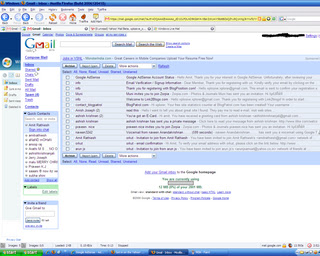
Gmail caused quite a storm on its release, one gigabyte of storage (now over 2gb) shook up the online email market somewhat, and a slew of competitors quickly ramped up their offerings to stop the speeding up-take of Google’s brand new in-beta product. This coupled with their invite-only marketing ruse, which seemed to invoke furore on the internet, with everyone grabbling for invites and even purchasing them via eBay in an attempt to get a ‘trendy’ .gmail.com address. Despite the over-the-top hype, Google’s offering is a very accomplished first stab at an online email service provision. Fully Ajax-enabled, the interface is very simple, quick and simple to use. Instead of folders ‘Labels’ are used, allowing the quick viewing of custom-labelled emails and items, through the label sub-menu. Removing labelled items from your main inbox to allow them only to appear in the labelled view, is only realisable by choosing to label, then archive an email – a slightly odd way of doing things. The archive feature is also useful – removing those emails from your inbox you’d rather not see day-to-day, but keeping them safe and searchable within the vast storage Gmail offers.
As you may know, Google have released their own chat client; Google Talk, which provides VOIP services as well as standard text-based instant messaging. Interestingly, once logged in, the Gmail homepage provides you with a brilliantly realised web-based chat client that can provide similar IM functionality to that of Google Talk – with the same contacts and contact information. This is easily turned off at the bottom of the page if people are pestering you every time you check your email. Its an incredibly useful implementation, allowing IM anywhere you have web access without having to install a client and mess around with the host’s ports. Its certainly the best webpage-embedded IM solution I’ve seen thus far.
Some of the more ‘advanced’ features are usually hidden in an attempt to make the service immediately easier to use, these can quickly be found, but some users may prefer than an option to keep them permanently viewable was present.
The only worrying thing about a Google product offering, is how they’ll use your personal data. Already adverts appear that are being served from keywords in your emails. If you can live with Google’s relentless stride towards owning all information, everywhere, and want a simple web-based email client that doesn’t necessarily mimic a desktop-equivalent, Gmail may be for you.
INQ RATING: 8/10A very quick, responsive service with a simple interface, bellying a more complex, useful online email client.
Windows Live Mail beta :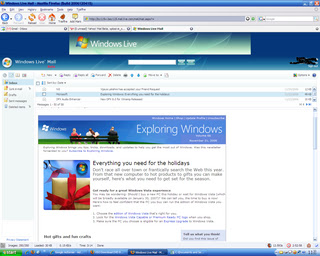
A recent addition to Microsoft’s ‘Live’ initiative, the new Windows Live Mail which seems to be an attempt at replacing Microsoft’s Hotmail offering, is the last of the three services here, to have entered beta testing. Hotmail is already pretty clunky and painful to use compared to a decently Ajax’d equivalent and I was looking forward to banishing this interface to a distant memory. However, as an alleged ‘beta’ product I was shocked at the numerous bugs, errors, and not-so-trivial problems I had when attempting to use the product over several months. While the other reviews here centre on the quality of offerings from Microsoft’s competitors, this will inevitably centre on the poorness of the product from the Hotmail team.
Spam is still inherent within the Hotmail service, despite Microsoft’s sabre-rattling’s about spam. I get at least 10-20 spam’s a day that aren’t caught by Microsoft’s spam filter out of about 40 total spams. Compared to Yahoo’s (around 5-10 not caught from 200) and Gmail (1 from 50) statistically Live’s spam filter is seemingly the least effective. It also seems to catch a lot of ‘real’ emails – something that the other two services hardly ever seem to do. These aren’t hard statistics though, only a rough guide from an end-user’s point of view.
The interface is very simple, with a left hand navigation pane, a list of your email in the main pain, and a preview pane, analogous to the usual Outlook Express view. The Live mail team may wish to look at Yahoo’s mail for a much better interface look, feel and style.
The Ajax-based requests seem to be slower than either of the other two sites. Hotmail has always been very sluggish and prone to service problems and this seems to be compounded when moving to an Ajax-esque front-end – displays similar to ‘Your request is being sent’ seem to appear for long periods, sometimes without ever disappearing, forcing a new request by the user to be performed. Multi-selecting items to send them to a folder, or select them as spam, produces a ‘We were not able to complete your request’ around fifty per-cent of the time – albeit the function has usually been performed.
Originally the service didn’t support Firefox - a later build of the product which went live, attempted to fix this, but was subsequently pulled due to unknown problems with the rest of the service. Since its reinsertion I’ve not been able to view my inbox in either client, albeit I hear that on other people’s designated servers it seems to be fine. Thus other the last month, or so, I’ve had to resort to the ‘Classic’ view which forces the Live mail service to use a more Hotmail-esque display, without the many Ajax-based additions. The enhanced Live Mail service simply won’t load on any machine I try it on – Internet Explorer returns a JavaScript error and no inbox, Firefox produces an error page asking you to report the error to Microsoft – the link to perform the feedback is broken.
INQ RATING 2/10Microsoft must try harder.
Conclusions:Those wishing for a full-blown desktop client replacement need not look further than Yahoo! Mail. Impressively designed and executed, I can find little fault with Yahoo’s product. Those wishing for a slightly less full-blown desktop-orientated design approach should certainly check out Google’s Gmail (or Googlemail as it’s known). This provides very quick email authoring, searching and browsing, coupled with a rather excellent web-based chat client – provided you are happy with Google’s continuing encroaches into your private data.
I cannot recommend Hotmail in any way. Spam is still a huge issue that Microsoft cannot seem to cope with, especially when coupled with their Hotmail/Live service. Even though the product is said to be beta, it seems more alpha-build quality and should never have been released to the public in this form. This is another rushed product to counter Google et al, that doesn’t come near to the quality of other Microsoft Live beta services such as ‘Windows Live Local’, let alone competitors rival products. µ L’Inqs