Are you worried about spam in your precious gmail account ?If yes, then you would like to consider making aliases of your gmail id to use when you're not sure whether you're signing up for something safe or not.
It is a very simple task to provide an alias of your gmail id. Whenever you sign up on the internet on some site that you think may not be safe(or a site which might send you spam),all you have to do is give out the email address as
username+insertanythingyouwanthere@gmail.com
For example if your email id is james@gmail.com,you can provide james+21@gmail.com or james+test@gmail.com .You can put anything after the + and all email sent will still go to your gmail account.
In the event that you did give your email to a spammer and you start receiving spam, don't worry! Just create a filter, and make everything that is sent to username+whateveryouputhere@gmail.com go to the trash. This way all the spam that you might get will automatically be deleted.Did you find it useful?Feel free to comment.
Showing posts with label Mail. Show all posts
Showing posts with label Mail. Show all posts
Sunday, January 21, 2007

Friday, January 12, 2007
Desi Mail for Desi People

One fine day when I checked my Rediffmail free email account, I just couldn’t believe my eyes 00...Sitting right there above the login form fields was a small message that mentioned a 1GB space for the email account!!! Rediffmail also has a paid version for their email service, which I guess has had a reasonable amount of success, so I thought that this 1GB is a good idea to gather more paid members. However, to my utter surprise when I entered by INBOX and on a hunch checked the "Storage Space" I found that this 1GB space is for the free accounts. I almost fell off my chair!!!
Rediff and Rediffmail
For those who don’t know about Rediffmail, it has been one of the premier web email providers in India. Their portal (www.rediff.com) is also very popular – at least I use its cricket section whenever I need to check scores. Rediff was one of the first to launch a portal of stature in India. Riding the Internet wave (to use a cliché), several other companies made their online presence. There was Indiainfo.com, which had advertised in all forms all over the country and is now forgotten by most of us! Indiatimes.com was a portal launched by the Times of India newspaper group. I guess, it has also been a success because it has a very good offline medium to advertise – the Time of India newspaper… And there was Indya (www.indya.com). All these portals offered free email accounts.
A few years back Rediffmail came up with a brilliant idea. It started to advertise its free email account service – their punch line was Lightning fast email and it indeed was! At that time, net users in India used popular email services like Hotmail, Yahoo!, Snap etc. and most of us accessed the Internet with dial-up connections which were very slow. Accessing the INBOX at Hotmail or Yahoo! was so frustrating as it used to take so much time. I guess Rediff would have done a consumer survey and received a feedback that people needed to access email over quick servers. With their lightning fast email servers Rediffmail gave what everyone in India wanted – fast access to online email.
The very idea of advertising a free email service and spending money to upgrade it was something that other portals had not thought about. Rediffmail’s competition too advertised their services but the ads mentioned different services offered by the portal and did not put emphasis on one particular service.The Lightning fast Rediffmail gained a loyal following.This was followed by the email over mobile phone service from Rediffmail. Users could access the Rediffmail INBOX via their cell phones.
Nowadays, since, most net surfers in India either use cable or DSL (or sit at CyberCafes which use either of these services), accessing the Internet over fast connections is no longer a problem. So Rediffmail comes up with another beauty – offering free 1GB email account. Obviously, this step has been prompted by the release of Gmail, but the fact that an Indian company has taken this step is something that all Indians should be proud of!
Testing the Rediffmail 1GB
I sent four emails to my Rediffmail account with fairly large attachmentsfrom my friends computer. Using DSL, I was able to download these emails back to my computer in seconds - 12.9MB, 1.1MB, 4.4MB and 7.4Mbtook 119, 10, 32 and 72 seconds respectively. So Rediffmail is not only lightning fast it also provides a huge storage space.
Tuesday, January 09, 2007
HOW TO HACK AOL®, YAHOO® AND HOTMAIL®
I get numerous calls from people who want to recover AOL®, Yahoo® or Hotmail® or other online and email passwords. I do not do this type of work. Many of these people claim that they have lost their passwords because they have been hacked and now need to get their password back. As I have reviewed information on the web, I found very little real information about the actual techniques that could be used to hack these services. So I decided to pull together a detailed explanation. What follows is a detailed explanation of the methodologies involved. I do not condone any illegal activity and I clearly mention in this article techniques that are illegal. Sometimes these methods are known as "Phishing."
THE HOAX
Let's dispose of one technique that is absolutely a hoax (meaning a fraud: something intended to deceive; deliberate trickery intended to gain an advantage.) If you see a newsgroup post or web page with something like the following, it is a hoax and will not work.
: : : (([[THIS REALLY WORKS ]])) : : :
(1) send an E-mail to passwordrecovery@yourdomainhere.com
(2) In the subject box type the screenname of the person whose password you wish to steal
(3) In the message box type the following: /cgi-bin/start?v703&login.USER=passmachine&class=supervisor&f={your aol password}&f=27586&javascript=ACTIVE&rsa
(4) Send the e-mail with priority set to "high" (red ! in some mailprograms)
(5) wait 2-3 minutes and check your mail
(6) Read the message.-Where YOUR password was typed before, NOW, the password of the screenname in the code string is there!!!
Why does this work? It´s a special decryption-server that AOL-employees can use to decrypt passwords.The aolbackdoor account is a bot that reads your authentification from the message body and identifiying you as a valid AOL Staff-member, you will get the password mailed back to you. The trick is that this Bot´s script seems to be a little bit buggy and it automatically recogises you as an supervisor (AOL-Staff member), even if you use a normal AOL account. This means, that EVERYONE having a valid AOL account can hack as many other accounts as he wants.
This is just a scam to steal your password and may explain some of the calls I get from people saying they were hacked. Never give your password to anyone. No legitimate web service or customer service representative will ask for it or need it. There is no magic email address or series of commands that will reveal the passwords of users.
LOCALLY STORED PASSWORDS
Most browsers, including Internet Explorer® and Netscape®, the AOL® client, and Windows® Dial-Up Connections allow you the option to store passwords. These passwords are stored on the local machine and (depending upon where and how it is stored) there is usually a method of recovering these passwords. Storing any password locally is insecure and may allow the password to be recovered by anyone who has access to the local machine. While I am not currently aware of any program to recover locally stored AOL® passwords, I do not recommend that these are secure. Software does exist that can recover most of the other types of locally stored passwords.
TROJAN
A Trojan is a program that is sent to a user that allows an attacker to control functions of the target computer, recover information from the target or to delete or damage files on the target. The name Trojan is given because the program will usually come attached to some other program or file that entices you to run it. There are a wide variety of Trojans any number of which can be programmed to capture passwords as they are typed and to email or transmit them to a third party. To protect yourself against Trojans, you should never execute or download software or files that are not from a trusted source. It is critical that anyone working on internet use a virus protection program (which should catch most Trojans.) Note that since a Trojan requires the password to be typed or stored in order to be recovered, this is not an effective way to recover your own password. It could explain, however, how someone could lose their password to a hacker. Sending someone a Trojan program is certainly illegal and I do not recommend or condone this activity. A Trojan is unlikely to be effective in recovering a particular account password since it requires the target to install it. However, hackers will often bulk mail Trojans to thousands of people in the hope that a small percentage will get caught. Legitimate account holders who may have been caught by a Trojan and can authenticate themselves should contact their service provider to have their account passwords reset.
KEYLOGGER
A keylogger is a program or piece of hardware that records all keyboard keystrokes to an encrypted file which can then be read later. Based on the order of the keystrokes, it is usually easy to identify the password(s) from the file later. Like the Trojan, this also requires that someone actually type the password. Keyloggers come in two types: hardware and software. A hardware keylogger can be fitted between the keyboard cable and the computer and can be activated with a few keystrokes. It is then left in place until after the password that you are looking to recover is typed. Later it is removed and the file of keystrokes is examined for the password. A hardware keylogger is undectable by anti-virus software. A software keylogger is installed on a system and effectively has the same function, however, it is a little bit more complex to use since it must be installed to run stealthily to be effective. A keylogger could be used to steal a password from someone who is using an office computer or sharing a computer. It is possible that installing and using such a device or piece of software could be illegal depending upon whether the target has a presumption of privacy when using the computer on which the keylogger is installed. SNIFFING
If two people do not share the same computer, but do share the same network, it may be possible for one to sniff the others' packets as they sign-on. The traffic between your computer and the internet site you are accessing may be able to be recorded and decrypted or "played-back." This is not a simple attack to execute, but is possible if two people are close to one another and share a hub. Again, this is likely to be illegal and I do not condone this activity.
BRUTE-FORCE ATTACK
Many people want to find software to perform a brute-force attack. This is really impractical. It would take hundreds of thousands of years to attempt any kind of reasonable brute-force attack on AOL®, Yahoo® or Hotmail® and this would expand exponentially if the password is longer than the minimum length. Using multiple computers or multiple sessions could reduce this to merely thousands of years. This is highly illegal since these services own the servers on which an account is hosted. Even if you are hacking your own account, you don't own the servers and the service is going to monitor and log this activity. It is extremely unlikely that you could recover a password in this way, but it is extremely likely that you'd be arrested and prosecuted for doing this.
Thursday, January 04, 2007
Beta Mail War
WE HAVE BEEN trialling the various beta programmes from the main online mail-behemoths since their respective inceptions. In fact, we have been unfortunate enough to have to use each one daily and today we’re going to take a quick look at each service, comparing and contrasting each product’s offerings.
Yahoo! Mail beta :
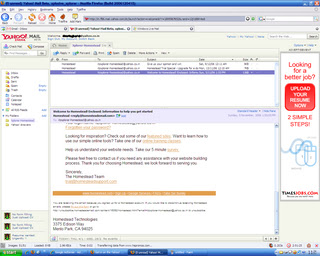 The original Yahoo Mail web-based client is now looking somewhat dated compared to offer newer offerings. Enter the new beta service from Yahoo, which is a giant step-up from the previous old, clunky interface. The new beta is fully Ajax‘d up and is easily the most immediately impressive out of the three products being examined here. The interface is very clear, easy to use, very quick to respond and is more reminiscent of a fully fledged desktop client than a browser-based utility. Its definitely a contender for an idealistic 'Web 2.0' product.
A clearly defined left-hand-side navigation pane, and a multi-tab viewing window that allows, for example, your inbox coupled with a preview pane or a newly invoked tab displaying an individual email, is easily one of the best interfaces for web-mail I’ve used to date. These sort of advanced Ajax features could be slow and unresponsive in a poorly implemented design – but Yahoo has ensured they’re almost as quick as a standard desktop application, with the added portability of a web-based client. It works perfectly with Firefox and now wth Opera too. All of these positive attributes add-up to ensure Yahoo is on to a winner with their updated mail service.
INQ RATING :9/10
Excellent 'Web 2.0' functionality, competently able to replace your desktop mail client on Firefox or Internet Explorer.
Gmail beta :
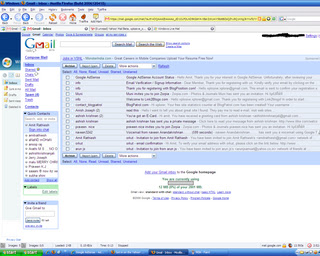 Gmail caused quite a storm on its release, one gigabyte of storage (now over 2gb) shook up the online email market somewhat, and a slew of competitors quickly ramped up their offerings to stop the speeding up-take of Google’s brand new in-beta product. This coupled with their invite-only marketing ruse, which seemed to invoke furore on the internet, with everyone grabbling for invites and even purchasing them via eBay in an attempt to get a ‘trendy’ .gmail.com address. Despite the over-the-top hype, Google’s offering is a very accomplished first stab at an online email service provision. Fully Ajax-enabled, the interface is very simple, quick and simple to use. Instead of folders ‘Labels’ are used, allowing the quick viewing of custom-labelled emails and items, through the label sub-menu. Removing labelled items from your main inbox to allow them only to appear in the labelled view, is only realisable by choosing to label, then archive an email – a slightly odd way of doing things. The archive feature is also useful – removing those emails from your inbox you’d rather not see day-to-day, but keeping them safe and searchable within the vast storage Gmail offers.
As you may know, Google have released their own chat client; Google Talk, which provides VOIP services as well as standard text-based instant messaging. Interestingly, once logged in, the Gmail homepage provides you with a brilliantly realised web-based chat client that can provide similar IM functionality to that of Google Talk – with the same contacts and contact information. This is easily turned off at the bottom of the page if people are pestering you every time you check your email. Its an incredibly useful implementation, allowing IM anywhere you have web access without having to install a client and mess around with the host’s ports. Its certainly the best webpage-embedded IM solution I’ve seen thus far.
Some of the more ‘advanced’ features are usually hidden in an attempt to make the service immediately easier to use, these can quickly be found, but some users may prefer than an option to keep them permanently viewable was present.
The only worrying thing about a Google product offering, is how they’ll use your personal data. Already adverts appear that are being served from keywords in your emails. If you can live with Google’s relentless stride towards owning all information, everywhere, and want a simple web-based email client that doesn’t necessarily mimic a desktop-equivalent, Gmail may be for you.
INQ RATING: 8/10
A very quick, responsive service with a simple interface, bellying a more complex, useful online email client.
Windows Live Mail beta :
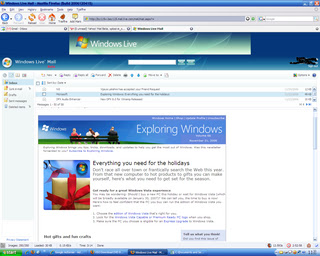
A recent addition to Microsoft’s ‘Live’ initiative, the new Windows Live Mail which seems to be an attempt at replacing Microsoft’s Hotmail offering, is the last of the three services here, to have entered beta testing. Hotmail is already pretty clunky and painful to use compared to a decently Ajax’d equivalent and I was looking forward to banishing this interface to a distant memory. However, as an alleged ‘beta’ product I was shocked at the numerous bugs, errors, and not-so-trivial problems I had when attempting to use the product over several months. While the other reviews here centre on the quality of offerings from Microsoft’s competitors, this will inevitably centre on the poorness of the product from the Hotmail team.
Spam is still inherent within the Hotmail service, despite Microsoft’s sabre-rattling’s about spam. I get at least 10-20 spam’s a day that aren’t caught by Microsoft’s spam filter out of about 40 total spams. Compared to Yahoo’s (around 5-10 not caught from 200) and Gmail (1 from 50) statistically Live’s spam filter is seemingly the least effective. It also seems to catch a lot of ‘real’ emails – something that the other two services hardly ever seem to do. These aren’t hard statistics though, only a rough guide from an end-user’s point of view.
The interface is very simple, with a left hand navigation pane, a list of your email in the main pain, and a preview pane, analogous to the usual Outlook Express view. The Live mail team may wish to look at Yahoo’s mail for a much better interface look, feel and style.
The Ajax-based requests seem to be slower than either of the other two sites. Hotmail has always been very sluggish and prone to service problems and this seems to be compounded when moving to an Ajax-esque front-end – displays similar to ‘Your request is being sent’ seem to appear for long periods, sometimes without ever disappearing, forcing a new request by the user to be performed. Multi-selecting items to send them to a folder, or select them as spam, produces a ‘We were not able to complete your request’ around fifty per-cent of the time – albeit the function has usually been performed.
Originally the service didn’t support Firefox - a later build of the product which went live, attempted to fix this, but was subsequently pulled due to unknown problems with the rest of the service. Since its reinsertion I’ve not been able to view my inbox in either client, albeit I hear that on other people’s designated servers it seems to be fine. Thus other the last month, or so, I’ve had to resort to the ‘Classic’ view which forces the Live mail service to use a more Hotmail-esque display, without the many Ajax-based additions. The enhanced Live Mail service simply won’t load on any machine I try it on – Internet Explorer returns a JavaScript error and no inbox, Firefox produces an error page asking you to report the error to Microsoft – the link to perform the feedback is broken.
INQ RATING 2/10
Microsoft must try harder.
Conclusions:
Those wishing for a full-blown desktop client replacement need not look further than Yahoo! Mail. Impressively designed and executed, I can find little fault with Yahoo’s product. Those wishing for a slightly less full-blown desktop-orientated design approach should certainly check out Google’s Gmail (or Googlemail as it’s known). This provides very quick email authoring, searching and browsing, coupled with a rather excellent web-based chat client – provided you are happy with Google’s continuing encroaches into your private data.
I cannot recommend Hotmail in any way. Spam is still a huge issue that Microsoft cannot seem to cope with, especially when coupled with their Hotmail/Live service. Even though the product is said to be beta, it seems more alpha-build quality and should never have been released to the public in this form. This is another rushed product to counter Google et al, that doesn’t come near to the quality of other Microsoft Live beta services such as ‘Windows Live Local’, let alone competitors rival products. µ L’Inqs
Yahoo! Mail beta :
 The original Yahoo Mail web-based client is now looking somewhat dated compared to offer newer offerings. Enter the new beta service from Yahoo, which is a giant step-up from the previous old, clunky interface. The new beta is fully Ajax‘d up and is easily the most immediately impressive out of the three products being examined here. The interface is very clear, easy to use, very quick to respond and is more reminiscent of a fully fledged desktop client than a browser-based utility. Its definitely a contender for an idealistic 'Web 2.0' product.
A clearly defined left-hand-side navigation pane, and a multi-tab viewing window that allows, for example, your inbox coupled with a preview pane or a newly invoked tab displaying an individual email, is easily one of the best interfaces for web-mail I’ve used to date. These sort of advanced Ajax features could be slow and unresponsive in a poorly implemented design – but Yahoo has ensured they’re almost as quick as a standard desktop application, with the added portability of a web-based client. It works perfectly with Firefox and now wth Opera too. All of these positive attributes add-up to ensure Yahoo is on to a winner with their updated mail service.
INQ RATING :9/10
Excellent 'Web 2.0' functionality, competently able to replace your desktop mail client on Firefox or Internet Explorer.
Gmail beta :
 Gmail caused quite a storm on its release, one gigabyte of storage (now over 2gb) shook up the online email market somewhat, and a slew of competitors quickly ramped up their offerings to stop the speeding up-take of Google’s brand new in-beta product. This coupled with their invite-only marketing ruse, which seemed to invoke furore on the internet, with everyone grabbling for invites and even purchasing them via eBay in an attempt to get a ‘trendy’ .gmail.com address. Despite the over-the-top hype, Google’s offering is a very accomplished first stab at an online email service provision. Fully Ajax-enabled, the interface is very simple, quick and simple to use. Instead of folders ‘Labels’ are used, allowing the quick viewing of custom-labelled emails and items, through the label sub-menu. Removing labelled items from your main inbox to allow them only to appear in the labelled view, is only realisable by choosing to label, then archive an email – a slightly odd way of doing things. The archive feature is also useful – removing those emails from your inbox you’d rather not see day-to-day, but keeping them safe and searchable within the vast storage Gmail offers.
As you may know, Google have released their own chat client; Google Talk, which provides VOIP services as well as standard text-based instant messaging. Interestingly, once logged in, the Gmail homepage provides you with a brilliantly realised web-based chat client that can provide similar IM functionality to that of Google Talk – with the same contacts and contact information. This is easily turned off at the bottom of the page if people are pestering you every time you check your email. Its an incredibly useful implementation, allowing IM anywhere you have web access without having to install a client and mess around with the host’s ports. Its certainly the best webpage-embedded IM solution I’ve seen thus far.
Some of the more ‘advanced’ features are usually hidden in an attempt to make the service immediately easier to use, these can quickly be found, but some users may prefer than an option to keep them permanently viewable was present.
The only worrying thing about a Google product offering, is how they’ll use your personal data. Already adverts appear that are being served from keywords in your emails. If you can live with Google’s relentless stride towards owning all information, everywhere, and want a simple web-based email client that doesn’t necessarily mimic a desktop-equivalent, Gmail may be for you.
INQ RATING: 8/10
A very quick, responsive service with a simple interface, bellying a more complex, useful online email client.
Windows Live Mail beta :

A recent addition to Microsoft’s ‘Live’ initiative, the new Windows Live Mail which seems to be an attempt at replacing Microsoft’s Hotmail offering, is the last of the three services here, to have entered beta testing. Hotmail is already pretty clunky and painful to use compared to a decently Ajax’d equivalent and I was looking forward to banishing this interface to a distant memory. However, as an alleged ‘beta’ product I was shocked at the numerous bugs, errors, and not-so-trivial problems I had when attempting to use the product over several months. While the other reviews here centre on the quality of offerings from Microsoft’s competitors, this will inevitably centre on the poorness of the product from the Hotmail team.
Spam is still inherent within the Hotmail service, despite Microsoft’s sabre-rattling’s about spam. I get at least 10-20 spam’s a day that aren’t caught by Microsoft’s spam filter out of about 40 total spams. Compared to Yahoo’s (around 5-10 not caught from 200) and Gmail (1 from 50) statistically Live’s spam filter is seemingly the least effective. It also seems to catch a lot of ‘real’ emails – something that the other two services hardly ever seem to do. These aren’t hard statistics though, only a rough guide from an end-user’s point of view.
The interface is very simple, with a left hand navigation pane, a list of your email in the main pain, and a preview pane, analogous to the usual Outlook Express view. The Live mail team may wish to look at Yahoo’s mail for a much better interface look, feel and style.
The Ajax-based requests seem to be slower than either of the other two sites. Hotmail has always been very sluggish and prone to service problems and this seems to be compounded when moving to an Ajax-esque front-end – displays similar to ‘Your request is being sent’ seem to appear for long periods, sometimes without ever disappearing, forcing a new request by the user to be performed. Multi-selecting items to send them to a folder, or select them as spam, produces a ‘We were not able to complete your request’ around fifty per-cent of the time – albeit the function has usually been performed.
Originally the service didn’t support Firefox - a later build of the product which went live, attempted to fix this, but was subsequently pulled due to unknown problems with the rest of the service. Since its reinsertion I’ve not been able to view my inbox in either client, albeit I hear that on other people’s designated servers it seems to be fine. Thus other the last month, or so, I’ve had to resort to the ‘Classic’ view which forces the Live mail service to use a more Hotmail-esque display, without the many Ajax-based additions. The enhanced Live Mail service simply won’t load on any machine I try it on – Internet Explorer returns a JavaScript error and no inbox, Firefox produces an error page asking you to report the error to Microsoft – the link to perform the feedback is broken.
INQ RATING 2/10
Microsoft must try harder.
Conclusions:
Those wishing for a full-blown desktop client replacement need not look further than Yahoo! Mail. Impressively designed and executed, I can find little fault with Yahoo’s product. Those wishing for a slightly less full-blown desktop-orientated design approach should certainly check out Google’s Gmail (or Googlemail as it’s known). This provides very quick email authoring, searching and browsing, coupled with a rather excellent web-based chat client – provided you are happy with Google’s continuing encroaches into your private data.
I cannot recommend Hotmail in any way. Spam is still a huge issue that Microsoft cannot seem to cope with, especially when coupled with their Hotmail/Live service. Even though the product is said to be beta, it seems more alpha-build quality and should never have been released to the public in this form. This is another rushed product to counter Google et al, that doesn’t come near to the quality of other Microsoft Live beta services such as ‘Windows Live Local’, let alone competitors rival products. µ L’Inqs
Subscribe to:
Posts (Atom)